
[:fr][vc_row][vc_column width= »1/4″][vc_images_carousel images= »659,660,661″ img_size= »full » autoplay= »yes » hide_pagination_control= »yes » wrap= »yes »][/vc_column][vc_column width= »3/4″][vc_column_text css= ».vc_custom_1454942695755{padding-right: 10px !important;padding-bottom: 10px !important;padding-left: 10px !important;background-color: #285979 !important;border-radius: 5px !important;} »]
Suite logicielle dédiée à la cartographie
[/vc_column_text][vc_column_text]OCAD est plus qu’un simple logiciel de dessin carte. OCAD vous fournit un logiciel puissant pour produire et éditer tout type de cartes (par exemple, des cartes topographiques, plans de ville, de randonnée et cartes de vélo , cartes internet). Il fournit des interfaces dans les domaines suivants: la capture de données géospatiales (application mobile), l’importation et l’exportation de géo données, Desktop Publishing (DTP) et la création de cartes Web. En outre, avec le dernier add-on – ThematicMapper – il vous permet de créer même des cartes thématiques avec OCAD.[/vc_column_text][vc_row_inner][vc_column_inner width= »1/2″][vc_btn title= »Demander un devis » color= »danger » i_icon_fontawesome= »fa fa-eur » add_icon= »true » link= »url:http%3A%2F%2F3grt.fr%2Fwordpress%2Fcontact%2F|| »][/vc_column_inner][vc_column_inner width= »1/2″][vc_btn title= »Télécharger la brochure » i_icon_fontawesome= »fa fa-book » add_icon= »true » link= »url:http%3A%2F%2F3grt.fr%2Fwp-content%2Fuploads%2F2016%2F02%2FOCAD12.pdf||target:%20_blank »][/vc_column_inner][/vc_row_inner][/vc_column][/vc_row][vc_row][vc_column][vc_separator][/vc_column][/vc_row][vc_row][vc_column width= »1/2″][vc_column_text]
Capture de donnés géodésiques
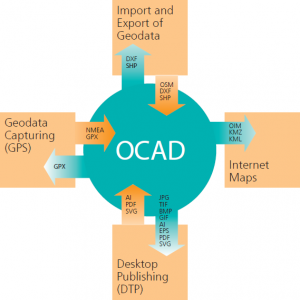
Ocad peut être installé très rapidement et fonctionne facilement sur Windows Tablet PC en raison de son logiciel simplifié et ressources matérielles efficacement utilisées.
En outre, OCAD possède une interface pour recevoir les signaux GPS et un télémètre laser de signaux (TruPulse). Par conséquent, OCAD est très approprié pour la capture des données géographiques. Avec le même logiciel vous pouvez capturer des données, les modifier et publier.
De plus, les outils d’importation et d’exportation pour les données GPS (GPX, fichiers NMEA etc.) élargissent l’éventail des applications GPS possibles.[/vc_column_text][/vc_column][vc_column width= »1/2″][vc_column_text]
Importation et exportation de donnés géodésiques.
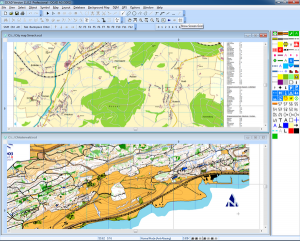 La vectorisation des cartes de fond numérique est l’une des applications les plus puissants et efficaces de OCAD.
Cependant, de nos jours, un grand nombre de géo-données sont fournies à un prix abordable (par exemple SHP ou DXF) par des instituts topographiques ou géodésiques nationaux, ou même gratuitement par OpenStreetMap.
Par conséquent, OCAD a développé une fonction d’importation et d’exportation des données géographiques (SHP, DXF, fichiers OSM etc.), qui vous permet d’assigner des géo-données à vos symboles de carte prédéfinis automatiquement et maintenir la base des données géographiques d’origine fourni ainsi (ODBC Connection).[/vc_column_text][/vc_column][/vc_row][vc_row][vc_column][vc_column_text]
Publication assistée par ordinateur.
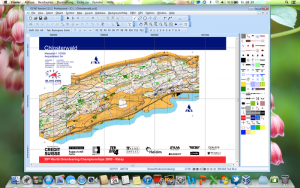
Les cartes imprimées sont encore très populaires en raison de leurs applications multifonctionnelles et simples. Pour cette raison, OCAD offre plusieurs formats d’exportation (Adobe Illustrator, PDF, SVG, EPS, etc.), de sorte que les cartes peuvent être imprimés dans un environnement DTP.
En outre, les fichiers de PAO (Adobe Illustrator, PDF, SVG, etc.) peuvent également être importés dans OCAD afin de bénéficier de ses dessins et d’édition d’outils cartographiques spécifiques ou de les transférer dans un environnement SIG.
[/vc_column_text][/vc_column][/vc_row][vc_row][vc_column width= »1/2″][vc_column_text]
Plans Internet.
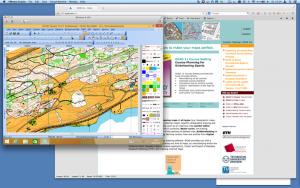 OCAD Internet Map (OIM) Assistant vous aide à créer une version Web interactive de vos cartes. Étape par étape, vous pouvez décider combien des niveaux de zoom de votre carte, des liens ou des fonctions de recherche qui devraient être ajoutées.
Toutefois, si vous préférez une version statique de votre carte, vous pouvez l’exporter au format raster ou la rendre compatible avec votre navigateur (KML / KMZ).[/vc_column_text][/vc_column][vc_column width= »1/2″][vc_column_text]
Utilisation mondiale de OCAD.
OCAD est disponible en 13 langues (anglais, tchèque, finnois, français, allemand, hongrois, italien, japonais, norvégien, suédois, espagnol, turc et portugais) et est utilisé avec succès dans plus de 65 pays dans une grande variété de secteurs: éditeurs de cartes, instituts nationaux de cartographie et de topographie (IGN), bureaux d’arpentage, ville, planification des districts et municipalité, pompiers, entreprises graphiques, bureaux d’études et d’ingénierie, écoles, universités, armée, sport et les clubs de loisirs, etc.[/vc_column_text][/vc_column][/vc_row][:en][vc_row][vc_column width= »1/4″][vc_images_carousel images= »659,660,661″ img_size= »full » autoplay= »yes » hide_pagination_control= »yes » wrap= »yes »][/vc_column][vc_column width= »3/4″][vc_column_text css= ».vc_custom_1454943000805{padding-right: 10px !important;padding-bottom: 10px !important;padding-left: 10px !important;background-color: #285979 !important;border-radius: 5px !important;} »]
We do whatever it takes to make your maps perfect.
[/vc_column_text][vc_column_text]OCAD est plus qu’un simple logiciel de dessin carte. OCAD vous fournit un logiciel puissant pour produire et éditer tout type de cartes (par exemple, des cartes topographiques, plans de ville, de la randonnée et le vélo cartes, Internet cartes). Il fournit des interfaces dans les domaines suivants: la capture de données géospatiales (application mobile), l’importation et l’exportation de géodonnées, Desktop Publishing (DTP) et la création de cartes Web. En outre, avec le dernier add-on – l’ThematicMapper – il vous permet de créer même des cartes thématiques avec OCAD.[/vc_column_text][vc_row_inner][vc_column_inner width= »1/2″][vc_btn title= »Get a Quote » color= »danger » i_icon_fontawesome= »fa fa-eur » add_icon= »true » link= »url:http%3A%2F%2F3grt.fr%2Fwordpress%2Fcontact%2F|| »][/vc_column_inner][vc_column_inner width= »1/2″][vc_btn title= »Download Datasheet » i_icon_fontawesome= »fa fa-book » add_icon= »true »][/vc_column_inner][/vc_row_inner][/vc_column][/vc_row][vc_row][vc_column][vc_separator][/vc_column][/vc_row][vc_row][vc_column width= »1/2″][vc_column_text]
OCAD Mapping Software.
OCAD is more than just a map drawing software. OCAD provides you with a powerful software package for producing and editing any kind of maps (e.g. topographic maps, city maps, hiking and biking maps, Internet maps).
It provides interfaces within the following fields: Geodata Capture (mobile application), Import and Export of Geodata, Desktop Publishing (DTP) and creating Web Maps. Moreover, with the latest add-on – the ThematicMapper – it enables you to create even thematic maps with OCAD.[/vc_column_text][/vc_column][vc_column width= »1/2″][vc_column_text]
Geodata Capture.
Vectorisation des cartes de fond numérique est l’une des applications les plus puissants et efficaces de l’OCAD.
Our Software can be installed very quicky and runs easily on Windows tablet PC’s due to its streamlined software and efficiently used hardware resources.
Moreover, OCAD has an interface to receive GPS and laser range finder (TruPuls) signals. Therefore, OCAD is very much suitable for geodata capturing. With the same software package you can capture data, and finally edit and publish it. In addition, the import and export tools for GPS data (GPX, NMEA files etc.) widen the range of possible GPS applications.[/vc_column_text][/vc_column][/vc_row][vc_row][vc_column][vc_column_text]
Import and Export of Geodata.
Vectorization of digital background maps is one of the most powerful and efficient applications of OCAD. However, nowadays a lot of (vectorized) geodata are provided at an affordable price (e.g. SHP or DXF file format) by national topographic or geodetic institutes, or even free of charge by OpenStreetMap. Therefore, OCAD has developed an import and export function for geodata (SHP, DXF, OSM files etc.), which helps you to assign geodata to your predefined map symbols automaticallyand maintain the provided original geodata base as well (ODBC Connection).
Desktop Publishing.
Printed maps are still very popular because of their multifunctional and simple application. For that reason, OCAD provides several export formats (Adobe Illustrator, PDF, SVG, EPS etc.) so that maps can be printed in a DTP environment. Furthermore, DTP files (Adobe Illustrator, PDF, SVG etc.) can also be importedinto OCAD in order to benefit from its specific cartographic drawing and editing tools or to transfer them into a GIS environment.
[/vc_column_text][/vc_column][/vc_row][vc_row][vc_column width= »1/2″][vc_column_text]
Internet Maps.
The OCAD Internet Map (OIM) Wizard helps you to create an interactive Web version of your maps. Step by step, you can decide how many zoom levels your map should have or which hotspots, links or search functions should be added.
However, if you prefer a static version of your map, you can export it in raster format or wrap it over one of the Planet Browsers (KML/KMZ).[/vc_column_text][/vc_column][vc_column width= »1/2″][vc_column_text]
Worldwide Use of OCAD.
OCAD is available in 13 languages (English, Czech, Finnish, French, German, Hungarian, Italian, Japanese, Norwegian, Swedish, Spanish, Turkish and Portuguese) and is being used successfully in more than 65 countries in a great variety of sectors: map publishers, national institutes of cartography and topography, land surveying offices, town-, district- and municipality planning, fire brigades, graphics firms, planning and engineering offices, schools, universities, army headquarters, sport and recreation clubs etc.[/vc_column_text][/vc_column][/vc_row][:]